The bargain behind the checkbox
The checkbox that reads I’m not a robot began as a test. Show a person something a machine cannot read, and whoever reads it is a person. That test no longer holds. A 2023 study timed 1,400 people on the CAPTCHAs of the most visited websites and found them solving with 50 to 85 per cent accuracy, against 85 to 100 per cent for the automated solvers published in the attack literature, which were also faster in all but one case.1 The puzzles a solver still cannot manage are relayed to people paid to solve them, at retail prices that were already one or two dollars per thousand in 2010.2 What protects a form today is rarely the puzzle. It is everything collected around it.
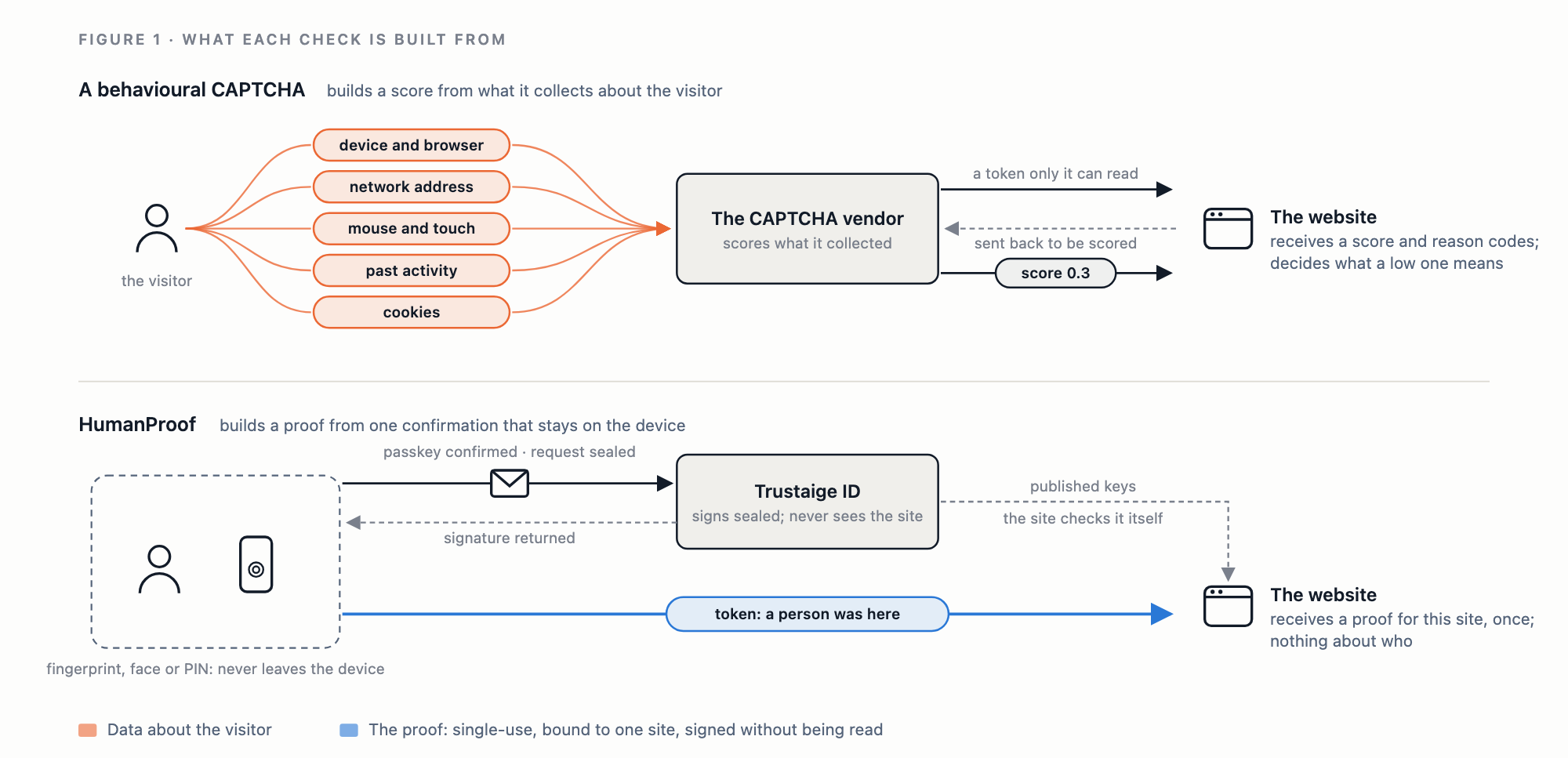
The industry has drawn the obvious conclusion. Bot defence has become fraud defence: platforms that observe each visitor’s device, network, behaviour and history, compute a score, and offer, in Google’s description of its own product, “bot, account, and transaction protection across the agentic web”.3 What a low score costs the visitor is left to the site: a puzzle, a second factor, or a refusal. This works, to a degree, and it works by watching.
That bargain has costs that fall in three places. The visitor is observed by a third party in order to fill in a form, and has no view of what was collected or how long it is kept. The site receives a score between 0.0 and 1.0 with reason codes, which say what the model concluded but give the site nothing it can show a customer it has turned away. And the people most likely to score badly are ordinary ones whose circumstances look unusual from a distance: a new phone, a shared address on a mobile network, an assistive technology, a browser that blocks trackers. Each of them is sent down the harder path, and where that path is a puzzle, it is where accessibility already fails.4 The arrival of software agents that operate browsers on a person’s behalf makes behaviour a weaker signal each year, not a stronger one.
Two kinds of free check already drop the puzzle. Cloudflare’s Turnstile runs “a series of small non-interactive JavaScript challenges to gather signals about the visitor or browser environment”, among them proof-of-work and checks for “browser-quirks and human behavior”, and a site must send each token back to Cloudflare to be validated before it means anything.5 It collects less than a fraud platform, but it still decides by examining the browser, and the vendor still takes part in every check. Open-source proof-of-work checks such as ALTCHA go further on privacy: they collect nothing, and the site verifies the answer on its own server with “no third-party service call required”.6 Their price is computation, and computation is unevenly priced. A 2003 paper on such functions warned that they may be “ineffective against malicious users with high-end systems, prohibitively slow for legitimate users with low-end systems, or both”,7 and a vendor of one writes that “some devices solve the PoW challenge in seconds, others take ages — or give up”.8
A different question
We replaced the CAPTCHA on our own forms with a check that asks a different question. It does not ask whether a visitor behaves like a person, or whether their device will spend a few seconds computing. It asks whether a person, a moment ago, confirmed something on a device they hold, with their fingerprint, face or screen-lock PIN.
That is what a passkey ceremony attests. When a passkey signs in, the device reports whether the user was verified, and it cannot report so without the person’s finger, face or PIN. Nearly every phone in use can do this: our field note on passkey readiness found that the cheapest smartphone each brand sells today can hold a passkey, and that the phones which cannot are those never updated past Android 8, or past iOS 15 on an iPhone 7 or older.9 The capability is already in visitors’ hands. What was missing was a way to turn one confirmation into a proof a website can check, without that proof becoming a record of where the person has been.
We call the result HumanProof. A visitor ticks I’m human, confirms with the phone’s or laptop’s own system prompt, and the website receives a token that says a person was here and nothing else.
What a site gains
Nothing to solve. There are no images, no audio clips and no timer. A visitor who already holds a passkey makes one tap and confirms with a fingerprint or PIN, the same gesture used to unlock the phone a hundred times a day. A visitor who does not is offered one in place, without leaving the form: one tap creates the passkey, and creating it is itself the proof. One confirmation yields a few proofs, which the browser keeps for that site alone for half an hour, so a person who fills in two forms in one visit confirms once.
The same answer every time. A check that scores behaviour can let a person through today and stop them tomorrow, because a new phone, a VPN, a shared mobile network or a browser that blocks trackers each moves the score, and the person cannot see why. HumanProof has no score and no threshold: a person who holds a passkey and confirms gets through, every time. When a request is refused, the site can say why in plain terms: no proof was given, the proof had already been used, or it is not valid for this site. Neither the site nor the visitor is left with you looked like a bot.
Nothing learned about the visitor, by anyone. The token is a Privacy Pass token, the IETF standard for anonymous authorization tokens.10 We sign it blind: the request we sign carries the site’s name in a form we cannot read, so we learn that a person proved, not where. The site learns that a person proved, not who. Two tokens from the same person cannot be linked to each other, and we cannot link a token to the ceremony that produced it. There is no cookie, no behavioural collection and no score. For a site that must account for the personal data it gathers, there is none here to account for.
A cost that falls on the attacker rather than the visitor. Every token requires a user-verified ceremony on a Trustaige identity. Each identity can draw only a limited number of tokens a day, each token can be spent once, and each is bound to the one site it was issued for, so a proof gathered elsewhere cannot be replayed on a site’s form. A puzzle costs a bot a fraction of a cent and costs a person their patience. A HumanProof token costs a person one tap and costs an operator an identity, a ceremony and a share of a daily allowance.
A check with no secrets to manage. A token is verified with our public keys, which are published at a well-known address, and the website’s own origin is part of what was signed, so the origin serves as the site key. Integration is a script tag on the page and one check on the server, and nothing in it needs to be kept secret.
A guard that stays shut. A request without a valid proof is refused, whether the widget was skipped, failed or never loaded. On our own forms, a failure to reach the verifier refuses the request rather than letting it through, because a guard that opens when its verifier is down can be removed by anyone who takes the verifier down.
Room to ask for more. A token states which tier signed it and nothing more. The first tier, Prove, means a verified passkey ceremony. The second, Prove+, adds a verified recovery contact behind the identity, so that each identity costs an operator a working inbox as well as a ceremony. A site can require the tier its risk warrants, and the visitor’s privacy is the same at every tier.
A clean line between people and their agents. Under this design a site does not have to guess whether a browser is driven by a person or by software. A person carries a proof of presence; an agent acting for a person carries a credential delegated by that person and naming them. A site can treat the two differently by design, rather than by inference from mouse movement.
| A behavioural CAPTCHA | HumanProof | |
|---|---|---|
| What the visitor does | Nothing, or a further step if the score is low | One tap and a fingerprint, face or PIN |
| Whether the same person passes twice | Depends on that day’s score | Yes, whenever they confirm |
| What the site receives | A risk score from 0.0 to 1.0, with reason codes | A single-use token: a person proved, at a stated tier |
| What the vendor learns | The visitor’s device, network and behaviour from page load, and each action the site asks it to score | That a person proved; not the site, not which person |
| What it costs an attacker | A solve, automated or bought | An identity, a ceremony and a share of a daily allowance |
| When the vendor is unreachable | Depends on the integration | The request is refused |
How it works, briefly
The ceremony runs in a small frame served from our identity service and embedded in the site’s page, so the visitor never leaves the page and the site never handles the passkey. On a successful ceremony the frame requests a small batch of blind-signed tokens, holds the spares for that site only, and hands one to the page. The tokens are publicly verifiable Privacy Pass tokens, RFC 9578 token type 2, built on RSA blind signatures.11 12
The idea is not ours alone. In 2021 Cloudflare tested accepting a hardware security key’s attestation in place of a CAPTCHA,13 and since 2022 Apple devices present Private Access Tokens, the same token type, with Apple as the attester.14 Both root the proof in the device and its maker. HumanProof roots it in a passkey on an identity the person holds, so it works on any phone or laptop that can hold a passkey, whoever made it.
sequenceDiagram
    participant P as Person
    participant F as Proof frame (Trustaige ID)
    participant I as Trustaige ID issuer
    participant S as Website server
    P->>F: Ticks "I'm human", confirms with fingerprint, face or PIN
    F->>I: Passkey assertion
    I-->>F: Allowance for a small batch of tokens
    F->>I: Blinded token requests (the site's name is hidden)
    I-->>F: Blind signatures
    F->>S: One token, sent with the form
    S->>S: Verify against published keys, for this site, not yet spent
The issuer sees a ceremony and a blinded request. It never sees the challenge, which carries the site’s name, and it keeps no record joining a ceremony to the tokens it produced. The site sees a token and the tier whose key signed it.
The difference from a scored CAPTCHA is in who takes part. In Google’s own description of its flow, the vendor’s script collects signals from the moment the page loads, and the site’s server sends each protected action’s token back to the vendor for an assessment, because only the vendor can read it.3 A HumanProof token can be read by anyone holding our published keys. The site can check it itself, without us; a site that prefers to ask us sends the token and nothing about the visitor.
Where we use it
HumanProof guards every request form on this site and the download of our reports. The reports are where the change is most visible. A report used to cost a reader their name, email address and organization, which we collected to keep robots from downloading in bulk. It now costs one tap, and we hold nothing about the reader afterwards. The same check guards the sign-up and contact forms on trustaige.com, where it replaced the third-party CAPTCHA we used before.
What it does not do
HumanProof is a proof of presence, not a fraud platform, and it should be judged as one.
- It proves a ceremony, not uniqueness. One person can hold several identities. The passkeys most people hold, synced through Apple’s or Google’s password managers, do not carry attestation on consumer accounts,15 so a patient operator running software authenticators can pass the first tier. The daily allowance and the cost of each identity slow that operator; they do not stop them. A tier that requires attested hardware is defined in the design and not yet issued.
- The first proof asks for a passkey. A checkbox asks for nothing up front. Creating a passkey takes seconds on any phone that can hold one, but it is still a step, and phones never updated past Android 8, which are 4.7 per cent of Android web use in Africa and 3.3 per cent worldwide, cannot take it.9
- It does not score transactions or detect account takeover. It says a person was present when the form was sent, not whether that person is the account holder or whether the payment is genuine. A site whose own sign-in uses passkeys has removed the commonest routes to account takeover, phishing and reused passwords, but that is a property of its sign-in, not of HumanProof.
- It is not for reading. No one will create a passkey to read a page, and it should not be put in front of one. It belongs where a person is about to act: a sign-up, a form, a download, a checkout.
- The site trusts us as issuer. A token is only as good as the ceremony behind it, and the site cannot inspect that ceremony. We publish our keys at one address, the same for every caller, so that no site or visitor can be singled out by the key that signed for them.
The checkbox, revisited
The I’m not a robot checkbox works by watching the visitor, and whether it lets a person through depends on what it saw. HumanProof asks for something else: a confirmation on the person’s own device, with their fingerprint, face or PIN. The site receives proof that a person confirmed, and nothing about which person. That is a narrower claim than a score makes, but it is one we can stand behind. The site knows a person was here, we know a person proved somewhere, and neither of us knows who was here.
References
-
Andrew Searles, Yoshimichi Nakatsuka, Ercan Ozturk, Andrew Paverd, Gene Tsudik and Ai Enkoji, “An Empirical Study & Evaluation of Modern CAPTCHAs”, 32nd USENIX Security Symposium, August 2023, §8 and Table 3. The human figures are the authors’ measurements; the solver figures are those reported in earlier attack papers. https://www.usenix.org/conference/usenixsecurity23/presentation/searles ↩︎
-
Marti Motoyama, Kirill Levchenko, Chris Kanich, Damon McCoy, Geoffrey M. Voelker and Stefan Savage, “Re: CAPTCHAs — Understanding CAPTCHA-Solving Services in an Economic Context”, 19th USENIX Security Symposium, August 2010. https://www.usenix.org/legacy/event/sec10/tech/full_papers/Motoyama.pdf ↩︎
-
Google Cloud, reCAPTCHA documentation, overview, accessed 14 October 2026. https://docs.cloud.google.com/recaptcha/docs ↩︎ ↩︎
-
W3C Accessible Platform Architectures Working Group, “Inaccessibility of CAPTCHA: Alternatives to Visual Turing Tests on the Web”, Group Draft Note, 16 December 2021. https://www.w3.org/TR/turingtest/ ↩︎
-
Cloudflare, “Turnstile” and “Server-side validation”, Cloudflare Developers documentation, accessed 14 October 2026. https://developers.cloudflare.com/turnstile/ and https://developers.cloudflare.com/turnstile/get-started/server-side-validation/ ↩︎
-
ALTCHA, “How it works”, accessed 14 October 2026; the library is MIT licensed. https://altcha.org/docs/how-it-works/ ↩︎
-
Martín Abadi, Mike Burrows, Mark Manasse and Ted Wobber, “Moderately Hard, Memory-Bound Functions”, Network and Distributed System Security Symposium, 2003. https://www.ndss-symposium.org/wp-content/uploads/2017/09/Moderately-Hard-Memory-Bound-Functions-Martin-Abadi.pdf ↩︎
-
Friendly Captcha, “Proof-of-work”, accessed 14 October 2026. https://friendlycaptcha.com/docs/explanation/proof-of-work/ ↩︎
-
Trustaige Research, “Every smartphone on sale can hold a passkey”. https://research.trustaige.com/notes/every-smartphone-can-hold-a-passkey ↩︎ ↩︎
-
A. Davidson, J. Iyengar and C. A. Wood, “The Privacy Pass Architecture”, RFC 9576, June 2024. https://www.rfc-editor.org/rfc/rfc9576.html ↩︎
-
S. Celi, A. Davidson, S. Valdez and C. A. Wood, “Privacy Pass Issuance Protocols”, RFC 9578, June 2024. https://www.rfc-editor.org/rfc/rfc9578.html ↩︎
-
F. Denis, F. Jacobs and C. A. Wood, “RSA Blind Signatures”, RFC 9474, October 2023. https://www.rfc-editor.org/rfc/rfc9474.html ↩︎
-
Thibault Meunier, “Humanity wastes about 500 years per day on CAPTCHAs. It’s time to end this madness”, Cloudflare blog, 13 May 2021. https://blog.cloudflare.com/introducing-cryptographic-attestation-of-personhood/ ↩︎
-
Apple Developer, “Challenge: Private Access Tokens”, 9 June 2022. https://developer.apple.com/news/?id=huqjyh7k ↩︎
-
Eiji Kitamura, “Determine the passkey provider with AAGUID”, web.dev, March 2024: “Passkeys on Android and Apple platforms don’t support attestation as of March 2024.” Apple supports attestation for managed Apple accounts in enterprise deployments. https://web.dev/articles/webauthn-aaguid ↩︎