The question from the field
The question came from a sales leader at a financial services company, not from its IT function. The organization’s identity provider was configured to require a password change every three months, a value set by an administrator in the provider’s configuration, and each cycle produced the same result. Some members of the field team missed the deadline; others attempted the change and failed. Those locked out could not read their email or open the applications on which their work depends, and they turned to their leader, who then spent a considerable part of each cycle coordinating with the IT department to restore access. The work fell outside the leader’s role, consumed time meant for the team, and recurred every three months. The leader was not seeking a security programme. The objective was a team that could sign in and sell.
The proposal brought to us was modest and specific: procure passwordless sign-in for the leader’s own unit, with the identity platform fronting Google Workspace so that email and the associated Google tools sat behind a passkey rather than an expiring password. One question had to be answered before the proposal could go to IT. The team works in the field, on phones its members own, and some of those phones are not new. Could those people sign in with a passkey at all?
Two observations precede the answer. First, the setting that caused the lockouts is out of step with current guidance, and the fault is shared. NIST’s digital identity guidelines now state that verifiers shall not require periodic password changes, and shall force one only on evidence of compromise.1 The requirement is addressed to the verifier, which is the identity provider, not to the administrator who configures it; the vendor shipped the setting and the organization chose ninety days. In a financial services company that value is rarely arbitrary: until 2022 the payment card standard required every user password to change at least once every ninety days, and the current version still accepts that rotation, as one of two options, for accounts that authenticate with a password alone.2 The clause now applies only where a password is the sole factor, and the standards council’s own guidance says an assessor may mark it not applicable once every in-scope system uses multi-factor authentication. A passkey removes the password altogether, so nothing remains for the clause to govern and nothing to rotate. How a passkey is counted against the standard’s other authentication requirements is a question for the assessor; the rotation cycle is not. It ends. Second, the readiness question is the most common one raised in any passwordless deployment, and it is usually answered from a desk, by consulting a device-support matrix and extrapolating. We answered it that way first, and then went to the market to check.
What a passkey needs from a phone
A passkey is a public-key credential created and stored by the phone’s platform, so what matters is the platform, not the sensor. Two cut-offs define readiness.
On Android, passkeys are supported on devices running Android 9 or later with Google Play services present; the platform’s Credential Manager stores them in Google Password Manager by default, and since Android 14 a user can choose another provider.3 Android 9 shipped in August 2018.4 The Go editions on the lowest-priced phones carry Play services, so they qualify. On iPhone, passkeys arrived with iOS 16 in September 2022, with iCloud Keychain and two-factor authentication turned on, and iOS 16 runs on the iPhone 8 and every model since.5 Both cut-offs sit at the same place in a phone’s life: a handset that misses them launched on Android 8 or earlier, or is an iPhone 7 or older, and was never updated. In practice that is a phone bought before 2019 and never updated since.
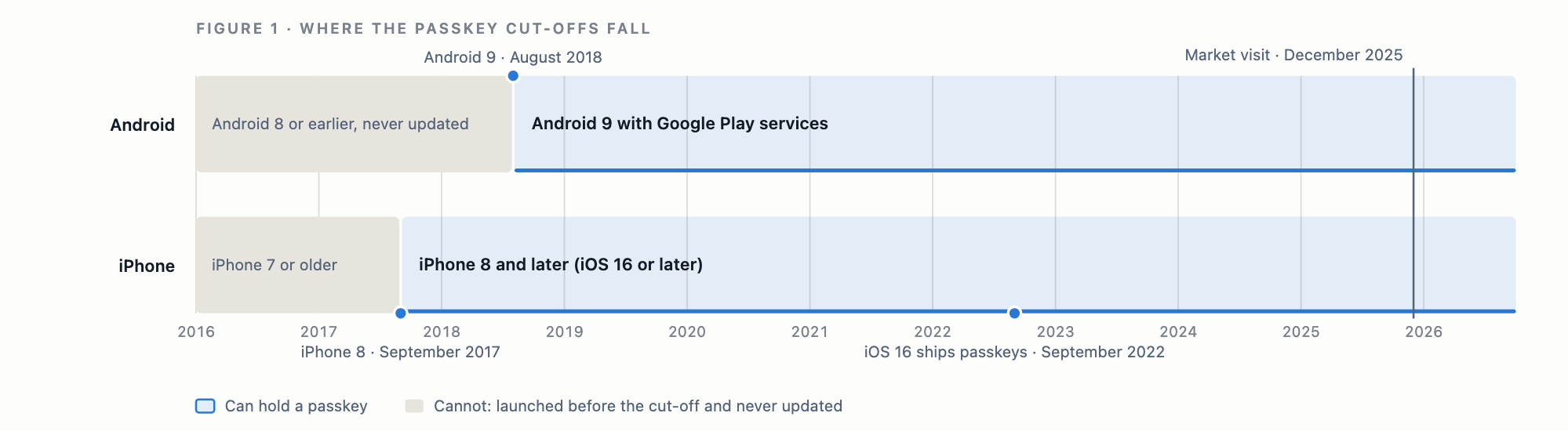
Two further conditions concern the person rather than the device: a screen lock must be set, and an account must be signed in for the passkey to sync to. Both are easy to overlook when the question is asked about hardware, and both matter more than the sensor.
What a sensor decides, and what it does not
Every smartphone unlocks by some means, and Android’s compatibility definition grades the strength of each.6
| Class | Typical hardware | What the platform lets it do |
|---|---|---|
| Class 3, strong | Fingerprint sensors, capacitive or in-display; 3D face systems | Unlock the phone, confirm through the biometric prompt, and release hardware-protected keys |
| Class 2, weak | Some camera-based face unlock | Unlock the phone and confirm inside apps, but not release keys |
| Class 1, convenience | Camera-based 2D face unlock on low-priced phones | Unlock the phone only; never offered for a credential |
A fingerprint sensor is almost always Class 3, and it is what a phone offers when a passkey must be confirmed. The 2D face unlock on a low-priced phone is Class 1: it opens the phone, and the passkey prompt falls back to the PIN or pattern instead. That fallback is not a degraded mode. WebAuthn’s user verification is satisfied by a PIN exactly as it is by a fingerprint; the relying party sees the same verified flag either way.7 A fingerprint makes a passkey convenient. A screen lock makes it work. The sensor matters only at the last step of the ceremony; everything before it is software.
What we found in the market
In December 2025, two months before our first application integration went live, we visited a phone market in which each brand sells from its own kiosk: iPhone, Samsung, Infinix, Tecno, itel, and others. At every kiosk we put the same question to the representative: was any phone available, at any price, without a fingerprint sensor or face unlock? Every representative gave the same answer: none, and the cheapest model on the shelf had both. We put the same question in writing to several dealers and received the same answer.
That is informant evidence, and it concerns sensors. It establishes that the lowest-priced smartphone each brand sells today unlocks with a fingerprint or a face, as reported by the people who sell them. It does not establish an OS version, whether Google services are present, or whether a passkey can in fact be created on that phone. Those are the questions that decide readiness, and they require a device-level test.
A protocol anyone can run
We did not test the phones on the kiosks. What we have from the market is what the sellers said about sensors; what we have from the standards and the vendors is where the cut-offs sit. The step that joins them is a device-level test, which the kiosk layout makes straightforward to specify, and we set it out here so that it can be run in any market, by us or by others.
At each brand kiosk, take the lowest-priced model currently on sale and record: model, launch year, price, shipped OS version and whether it is a Go edition, whether Google services are present, the sensor type and its class from the manufacturer’s specification, the screen-lock options offered, whether a passkey can be created, which verification the phone offers for it, and whether that passkey then signs in. A test account is signed in on the display unit with the seller’s permission, and the manufacturer’s specification page is recorded for every model so the sellers’ claims about sensors can be checked against the catalogue.
We state the expectations before anyone collects the data. Every phone with Android 9 or later and Google services will create a passkey. Most will confirm it with a fingerprint. Phones sold without Google services will fail. A single Android 9 phone with Play services that cannot create a passkey falsifies the first claim; a majority falling back to PIN falsifies the second.
Why the answer generalises
The phones on those kiosks are not a local peculiarity; they are the global entry tier. Transsion’s three brands, Tecno, Infinix, and itel, took close to half of the 84.4 million smartphones shipped in Africa in 2025 by Omdia’s count, and the same Go-edition models are sold across South Asia and beyond.8 If the cheapest phones this tier puts on sale can hold a passkey, every smartphone priced above them can too.
The desk data point the same way. In StatCounter’s measurement of Android web use for August 2026, Android 9 and later accounted for 96.5 percent of Android mobile page views worldwide and 95.3 percent in Africa; Android 8 and older together made up 3.3 and 4.7 percent.9 Roughly one Android phone in thirty worldwide, and one in twenty in Africa, still browses from software below the cut-off. That is the population the customer was asking about, and it is small, shrinking, and defined by software age rather than by price.

Capability, confirmation, admission
Most writing about passkey readiness collapses three questions into one, and the collapse is the source of most wrong conclusions.
Capability is whether the phone can hold a passkey. The cut-offs above decide it, and the cheapest phones on sale clear them. Confirmation is how the phone verifies the person when the passkey is used: a fingerprint on most, a PIN on the rest, and both satisfy the standard. Admission is whether an organization’s policy accepts the credential at the point of entry, and that is decided by the organization, not the phone.
The third question is where the field team is actually exposed. A passkey created on a low-priced Android is a synced credential, protected by the person’s Google account, not bound to the hardware. An organization whose posture policy requires hardware-bound credentials for a role will refuse every one of those phones, however new. That is a legitimate choice for administrators and a poor one for a field sales team, and it is the organization’s to make, per organization and per role. The sales leader who asked us faces no such policy: for a unit whose principal risk is a locked-out seller, a synced passkey on a phone the person already carries is the appropriate bar, and the device was never the obstacle.
What this does not settle
- One market, one visit, and informant evidence. We asked the people who sell the phones; we did not test the phones on the kiosks. Capability at the entry tier is inferred from the software those phones ship with, not demonstrated on them. The protocol above is how to close that gap, and we would welcome the table from any market.
- Owned phones are not display units. A team member’s own phone may have neither a screen lock nor a signed-in account, and this note does not measure how common that is.
- Phones sold without Google services fall outside the cut-offs. They are uncommon in the markets described here, and they are the exception to the title.
- The second-hand market. Used iPhones from before the iPhone 8, and used Androids that shipped on Android 8 and were never updated, are sold in the same markets and are not in this sample.
- Sensor class is read from specifications, not measured.
- We have an interest in the answer. Trustaige sells a passkey-based identity platform. The method is set out so that anyone can check the claims.
The phone was never the obstacle
The phones are ready. They have been ready since roughly 2019, and the people who sell them cannot find one that is not. What decides whether a field team can sign in with a passkey is a screen lock, a signed-in account, and a policy set by the organization. Two of those belong to the person. The third belongs to the organization, and it is the one that merits a decision.
The sales leader’s problem was never the phones the team carried. It was a password that expired every three months under a setting made for compliance and never revisited. Remove the password and the lockouts, the calls, and the time spent restoring access go with it. That is the assurance the leader was asking for, and the least expensive phone on the kiosk already has what it needs to provide it.
References
-
NIST Special Publication 800-63B, Revision 4, Digital Identity Guidelines: Authentication and Authenticator Management, §3.1.1.2 Password Verifiers, item 6: “Verifiers and CSPs SHALL NOT require subscribers to change passwords periodically. However, verifiers SHALL force a change if there is evidence that the authenticator has been compromised.” Published August 2025. https://pages.nist.gov/800-63-4/sp800-63b.html ↩︎
-
PCI Security Standards Council, PCI DSS v4.0, Requirement 8.3.9, carried forward from v3.2.1 Requirement 8.2.4 (“Change user passwords/passphrases at least once every 90 days”). The Council’s Summary of Changes from PCI DSS Version 3.2.1 to 4.0, r1, May 2022, p. 15, records the change: “Added the option to determine access to resources automatically by dynamically analyzing the security posture of accounts, instead of changing passwords/passphrases at least once every 90 days”, and clarifies that the requirement “applies if passwords/passphrases are used as the only authentication factor for user access”. https://listings.pcisecuritystandards.org/documents/PCI-DSS-v3-2-1-to-v4-0-Summary-of-Changes-r1.pdf The Council’s FAQ, Article 1590 (March 2025), adds that where MFA covers all in-scope components “the assessor can mark Requirements 8.3.9 and 8.3.10.1 as ’not applicable’”. https://pcisecuritystandards.org/faq/articles/Frequently_Asked_Question/do-pci-dss-requirements-8-3-9-and-8-3-10-1-apply-to-all-system-components The standard itself is distributed through the Council’s document library. https://www.pcisecuritystandards.org/document_library/ ↩︎
-
Google, Passkey support on Android and Chrome — passkeys are supported on devices running Android 9 (API level 28) or later; Credential Manager stores them in Google Password Manager by default, and from Android 14 users can choose another provider. https://developers.google.com/identity/passkeys/supported-environments ↩︎
-
Android Developers Blog, Introducing Android 9 Pie, 6 August 2018. https://android-developers.googleblog.com/2018/08/introducing-android-9-pie.html ↩︎
-
Apple Support, About the security of passkeys — passkeys require iOS 16, iPadOS 16, or macOS 13 or later, with iCloud Keychain and two-factor authentication turned on. https://support.apple.com/en-us/102195 ↩︎
-
Android Open Source Project, Biometrics and Measuring biometric unlock security — Class 3 (strong), Class 2 (weak), and Class 1 (convenience); only Class 3 and Class 2 may integrate with the biometric APIs, and only Class 3 may release keystore keys. https://source.android.com/docs/security/features/biometric and https://source.android.com/docs/security/features/biometric/measure ↩︎
-
W3C, Web Authentication Level 2, §4 Terminology, “User Verification” — a PIN, a pattern, or a biometric each satisfies user verification; the assertion carries a single verified flag. https://www.w3.org/TR/webauthn-2/#user-verification ↩︎
-
Omdia, African smartphone market jumps 14% in 4Q25, as entry-tier pressures signal 2026 reset, February 2026 (https://omdia.tech.informa.com/pr/2026/feb/african-smartphone-market-jumps-14percent-in-4a25-as-entry-tier-pressures-signal-2026-reset). Full-year 2025 shipments of 84.4 million, up 13 percent. Transsion’s share is reported as 48 percent (40.5 million units) by Gizmochina and as 44 percent by TechAfrica News; https://www.gizmochina.com/2026/02/25/transsion-captures-48-as-africa-smartphone-market-grows-13-in-2025/ and https://techafricanews.com/2026/02/26/africas-smartphone-market-hits-84-4-million-shipments-in-2025-up-13/ ↩︎
-
Statcounter Global Stats, Mobile Android Version Market Share, Worldwide and Africa, August 2026, full per-version export retrieved 4 September 2026. StatCounter measures share of page views, not of devices. https://gs.statcounter.com/android-version-market-share/mobile/worldwide/ and https://gs.statcounter.com/android-version-market-share/mobile/africa/ ↩︎