Two organizations, one person, nobody’s record
An auditor from one firm spends a quarter inside another company’s applications. Every directory handles this the same way: the company being audited creates a record for the auditor in its own tenant, as a member or as a guest. Three things follow, and two of them are invisible to the organization that made the record.
The company pays for, holds roles for and answers for a person it does not employ. The auditor’s own firm cannot see, audit or end the access its employee holds at a third party; that access is in someone else’s tenant. And when the auditor leaves the firm, the company finds out by phone call, or not at all. Until it does, a former employee answerable to nobody keeps access. The guest object with an expiry date narrows that window. It does not close it, because the expiry is a guess, made by the wrong organization, on the day of the invitation. The vendors know this: the tooling that asks a sponsor every few months whether a guest is still needed exists precisely because nobody expected the date to be right.1
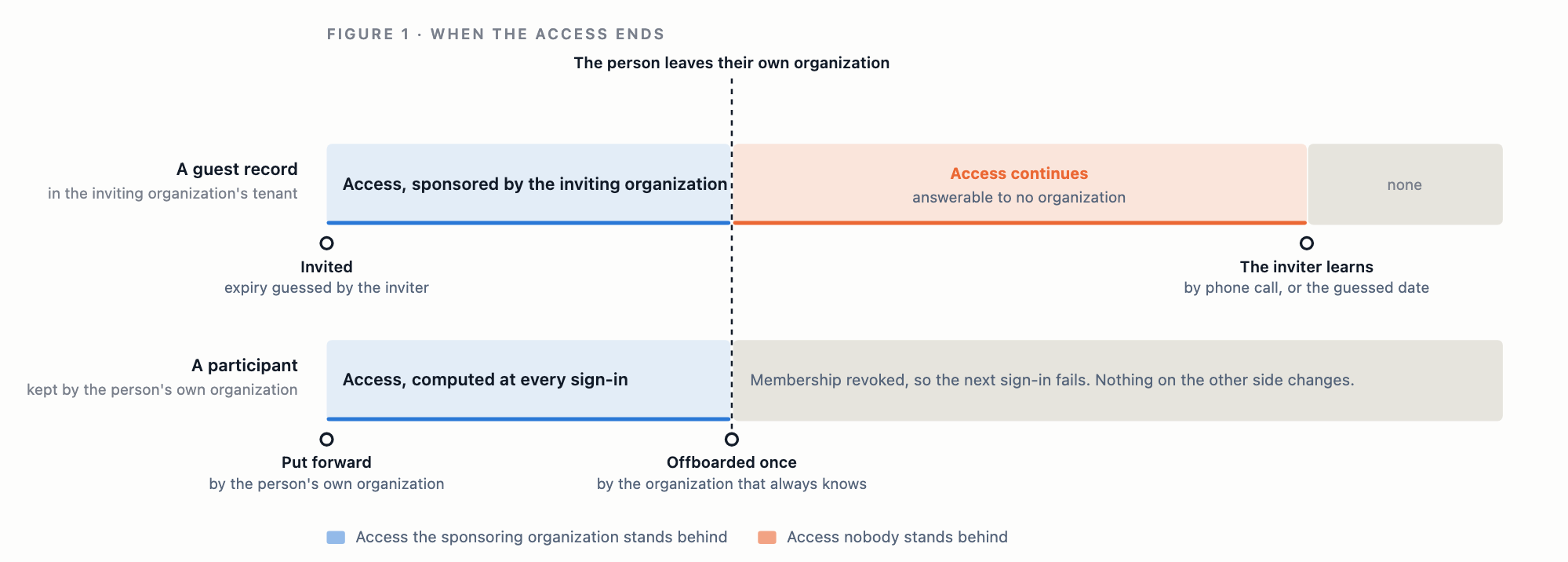
The previous note in this series argued that a person should not be issued by their employer, and it described the outsider case as “invite them, as a member or as a guest whose access expires on a date you set”. That sentence has the hole above in it. We have since removed the guest account entirely, and this note is about what replaced it. It describes the model and what the model guarantees, not our implementation; nothing below depends on how we built it.
Where the copy comes from
The directories most enterprises run represent an outsider as a copy, in one of three shapes. A user object typed “guest” that lives in your tenant and is redirected to its home tenant to authenticate;2 if the home tenant removes the person, you still own a guest that can no longer sign in, and if it does not, you own a guest that still can. A fresh account with a fresh credential, because the credential is scoped to the tenant’s own domain and works nowhere else.3 Or two directories wired together so that one pushes users into the other,45 which is a copy with a synchronization job attached.
The copy exists for a reason, and it is the same reason that put the user inside the tenant to begin with. Something has to hold a credential, apply a policy to it and answer for it. If the credential belongs to the tenant, the outsider must be a tenant object. Move the credential to the person, as a passkey does,6 and the copy loses its reason. What remains is the question the copy was standing in for: does this person, right now, have the standing to use this application? That is a question about two organizations, and it can be answered without either of them holding a copy of the other’s people.
The organization as a principal
In Trustaige ID an application is granted to people through groups. We added one thing: an organization can be granted an application, or placed in a group, in the same way a person or a group can. Two organizations that have agreed to collaborate are, to each other, principals. Either may share an application with the other, and the relationship has no host. Most real ones flow both ways: a vendor shares its portal, the customer shares its ticketing system. So the relationship is described by what flows in each direction, shared by you and shared with you, rather than by a role one side holds. What follows describes a single grant, and for that grant there are two facts that matter: which organization owns the application, and which organization employs the person.
The rule that holds the design together is that the organization that owns the application stores nothing about the other organization’s people. It stores the relationship and the grants: this organization, since this date, may reach these applications, through these groups. The organization that employs the person stores the participants: which of its own members take part, and by default none of them. Whether a particular person may use a particular application is never written down anywhere. It is computed every time:
| Term | Which organization holds the fact |
|---|---|
| The person is an active member of their organization | The employer |
| The person is one of that organization’s participants in this collaboration | The employer |
| The collaboration is active | Both |
| The application was granted to the person’s organization, directly or through a group | The owner of the application |
| The owner’s policies for the application admit the session | The owner, evaluated against the employer’s session |
Change any term and the next sign-in fails. The employer revokes the membership of someone who left, exactly as it would have anyway, and their access to every application shared with them ends with it. Nobody at the other organization is told, because nothing there needs to change. The offboarding gap is not narrowed; it is gone, because there is only one offboarding and it belongs to the organization that employed the person.
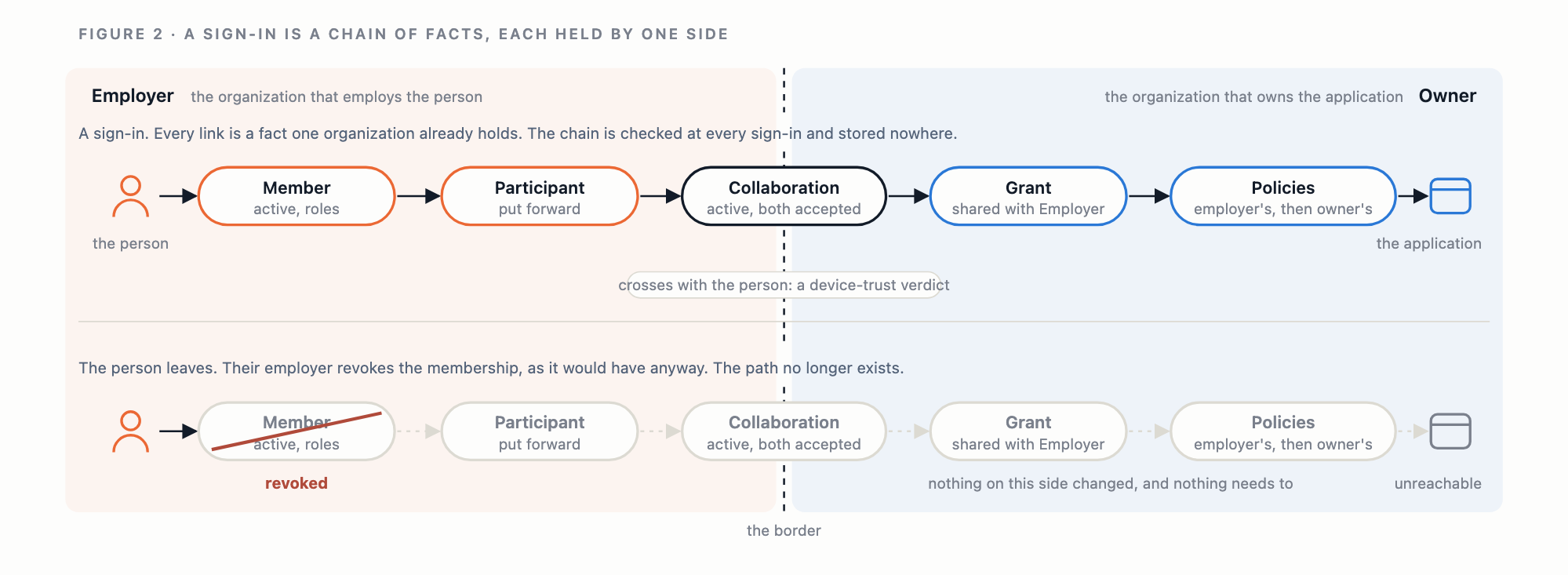
Two consequences of the rule are worth stating. A grant is made only by the organization that owns the application, so a collaborator cannot pass an application on to a third organization; grants do not travel. And an application its owner has left open to everyone is not reachable through a collaboration, because open means open to members. A collaborator reaches exactly what it was granted.
Whose rules apply
Both organizations’ rules, and both in full. The person signs in as a member of their own organization, so its conditions apply first: what authenticators it accepts, what assurance level it requires, what it demands of the device, where and when it permits sign-in. The organization that owns the application cannot weaken any of that. Then the owner’s own rules for the application apply, exactly as they would to one of its members: the countries and networks it allows, the hours it permits, the assurance level it requires, and any rule scoped to the group through which the application was granted. These are facts about the request and the session, and the owner evaluates them the same way regardless of whose employee is asking.
One fact cannot be produced across the border, and the reason is structural rather than a preference. Device trust belongs to one organization: a device is enrolled with, attested to and trusted by the organization that manages it, and the owner of an application has no relationship with a laptop it does not manage. Measuring another organization’s device itself would mean enrolling that device, which is the copy again by another route. So the owner’s device-trust policy still applies to the application, but what it reads is the verdict the person’s own organization produced: trusted by them, or not, without the reasons. One organization may define a trusted device as one running the latest operating system; another may define it as one with full-disk encryption; the two can collaborate without either adopting the other’s definition or seeing the other’s fleet. If the person’s organization runs no device trust at all, there is no verdict, and the policy fails closed.
The session itself belongs to the person’s own organization, because that is where they are a member; the application is reached through the grant. Before the application is reached, the person is told which organization shared it and that they are signing in as a member of their own organization, not of that one, so nobody is signed in somewhere they did not expect.
Who sees what
Each organization sees the other as one thing: a name, a logo, the applications shared in each direction, and the people the other chose to share. It never sees the other’s membership, its groups, its devices, its domains or its policies.
The application sees what it would see for any user of the person’s organization: the subject that organization holds for the person, their email and name as it records them, the owner’s groups the organization was placed in, and a claim naming the organization they came from. That is enough for the application to decide what the person may do without keeping a user list of its own. Subjects stay pairwise per organization, so nothing about the collaboration lets an application correlate the person with any other organization they belong to.
Both organizations keep an audit record of the same event. A sign-in across the border writes one entry into the owner’s record, attributed to a person of a named organization, and one into the employer’s, attributed to its own member using a named application of a named organization. Either side can answer an auditor without asking the other.
Who counts as another organization
An organization proves a domain with a DNS record. It may prove several, so that the three domains a company actually uses resolve to one organization rather than three, and a proved domain belongs to exactly one organization on the platform. That proof is what decides who is an outsider: an address at a domain the inviting organization has not proved belongs to someone another organization employs. It is also what makes acceptance safe. Accepting a collaboration on an organization’s behalf requires that the organization has proved the domain the invitation was sent to; without that, any mailbox at the invited domain could accept for any organization its holder happened to administer. The inviter is told nothing about which organization holds an address until that organization chooses to accept from it.
An address at a personal mail provider gets none of this. There is no organization to invite; the person is simply admitted as a member, managed and paid for by the organization that admitted them. That was always the case the guest handled correctly, and it needs no special role.
The sponsor
A visa is issued by the country being entered, but for a working visa there is usually a sponsor: an employer that vouches for the person and whose withdrawal ends the visa. The person’s own organization is the sponsor. The organization that owns the application sets the conditions at its own border and checks them every time; the sponsor decides who it vouches for and stops vouching the day the person leaves. Neither has to hold a copy of the other’s records for that to work, and the person, as before, is never issued by anyone.
References
-
Microsoft Learn, Manage guest access with access reviews — periodic reviews in which a sponsor or the guests themselves attest that access is still needed. https://learn.microsoft.com/en-us/entra/id-governance/manage-guest-access-with-access-reviews ↩︎
-
Microsoft Learn, What is Microsoft Entra B2B collaboration? — guests are “represented in your directory as a user object”, typed “guest”, with
#EXT#in the principal name, and since 2025 “redirected to their own organization’s sign-in page”. https://learn.microsoft.com/en-us/entra/external-id/what-is-b2b ↩︎ -
Okta Identity Engine documentation, Customize the Passkeys (FIDO2 WebAuthn) relying party ID domain — the relying party is the org domain or a custom domain, and a factor enabled on one URL “only allows access through that URL”. https://help.okta.com/oie/en-us/content/topics/identity-engine/authenticators/passkeys-relying-party-id.htm ↩︎
-
Okta documentation, Integrate with a company that uses Okta (Org2Org, hub-and-spoke). https://help.okta.com/oie/en-us/content/topics/architecture/ma/ma-okta-to-okta.htm ↩︎
-
Microsoft Learn, What is cross-tenant synchronization? — users are created in the target tenant and kept in step by a synchronization job. https://learn.microsoft.com/en-us/entra/identity/multi-tenant-organizations/cross-tenant-synchronization-overview ↩︎
-
W3C, Web Authentication: An API for accessing Public Key Credentials, Level 2, W3C Recommendation, April 2021. https://www.w3.org/TR/webauthn-2/ ↩︎