The question you cannot ask
Ask a CISO how many laptops are out of compliance right now, and you will get a number from a dashboard built for exactly that question, a promise to come back tomorrow, or a message to the one engineer who can write the query.
The data has existed the whole time. What is missing is a way to ask. Most consoles answer the questions its designers anticipated; that is what a dashboard is. The ones that matter arrive in unanticipated shapes: which leavers still have a device checked in? Who gained an admin role last month, and who approved it?
So the audit logs gets exported instead, and the security team’s most sensitive inventory takes a walk through whatever tool was nearest to hand. That is not a workflow. It is what people do when there is no way to ask.
What MCP is, quickly
The Model Context Protocol (MCP) is what an API becomes when the thing consuming it stops being a programmer.
An API is written for someone who reads documentation: a developer picks the endpoints, writes the integration, ships it — every decision made in advance and frozen into code. MCP, an open specification Anthropic introduced in late 2024 and now implemented well beyond them, arranges the same capability for a model. The server publishes its own tools, in prose, at runtime; the model picks the one that fits the question in front of it. Nobody wrote that integration.
Three words carry it. A client is the AI application — claude.ai, Claude Code, an IDE, an agent runtime. A server exposes capability to those clients. A tool is one named operation a server offers, with a description the model reads to decide whether to call it.
An MCP server is a contract that introduces itself while you work.
It does not retire your APIs — almost every MCP server sits on top of one, ours included. And it will not stay optional. The pull is coming from users, not vendors: people who start their day inside an assistant will not accept that half their tools are unreachable from it. Expect “does it have an MCP server?” beside “does it do SAML?” in evaluations within a year.
What we built
A built-in Directory MCP server, enabled for all organizations, exposing eight read-only tools:
| Tool | Answers | Scope |
|---|---|---|
whoami |
Which member this connection acts as, and with which scopes | — |
find_member |
Search members by name, email, or username | directory:read |
list_groups |
Groups with member counts | directory:read |
member_groups |
The groups one member belongs to | directory:read |
list_devices |
The fleet with compliance posture and check-in | devices:read |
member_devices |
The devices one member owns | devices:read |
security_events |
Recent audit events — sign-ins, denials, admin changes | events:read |
security_posture_summary |
Members by role, fleet compliance, unassigned devices | directory:read + devices:read |
The model does not get a database. It gets eight doors, each with a declared shape and a permission attached.
Connecting takes a minute
In claude.ai or Claude Desktop: Settings → Connectors → Add custom connector, paste the server URL, click Connect. A Trustaige consent page opens naming the client and every scope it wants. Approve, and the tools appear. In Claude Code, one command, then /mcp → Authenticate:
claude mcp add --transport http trustaige https://id.trustaige.com/mcp
Any spec-following client works, the server is a standard MCP protected resource with its own OAuth authorization server (RFC 9728, RFC 8414,
RFC 7591, PKCE). No SDK to install.
Then you ask “summarize our security posture” — and the answer comes back from your live estate, seconds later, with no CSV anywhere in the story.
Who is the AI, and how do I stop it
Who is it? Not a service account. A connection acts as the admin who approved it, with a name in your directory and a row in your audit trail. No orphan credential, no API key in a config file, no principal that outlives the person.
What can it see? Never more than its approver can. Each scope maps to the admin permission that already gates the same data in the console. An admin who cannot read the audit log in the UI cannot approve a connection that reads it through an assistant. The AI inherits authority. It cannot mint it.
How do I stop it? Revoke the connection and its tokens die immediately. Suspend the approving member and the same thing happens without anyone touching the AI settings.
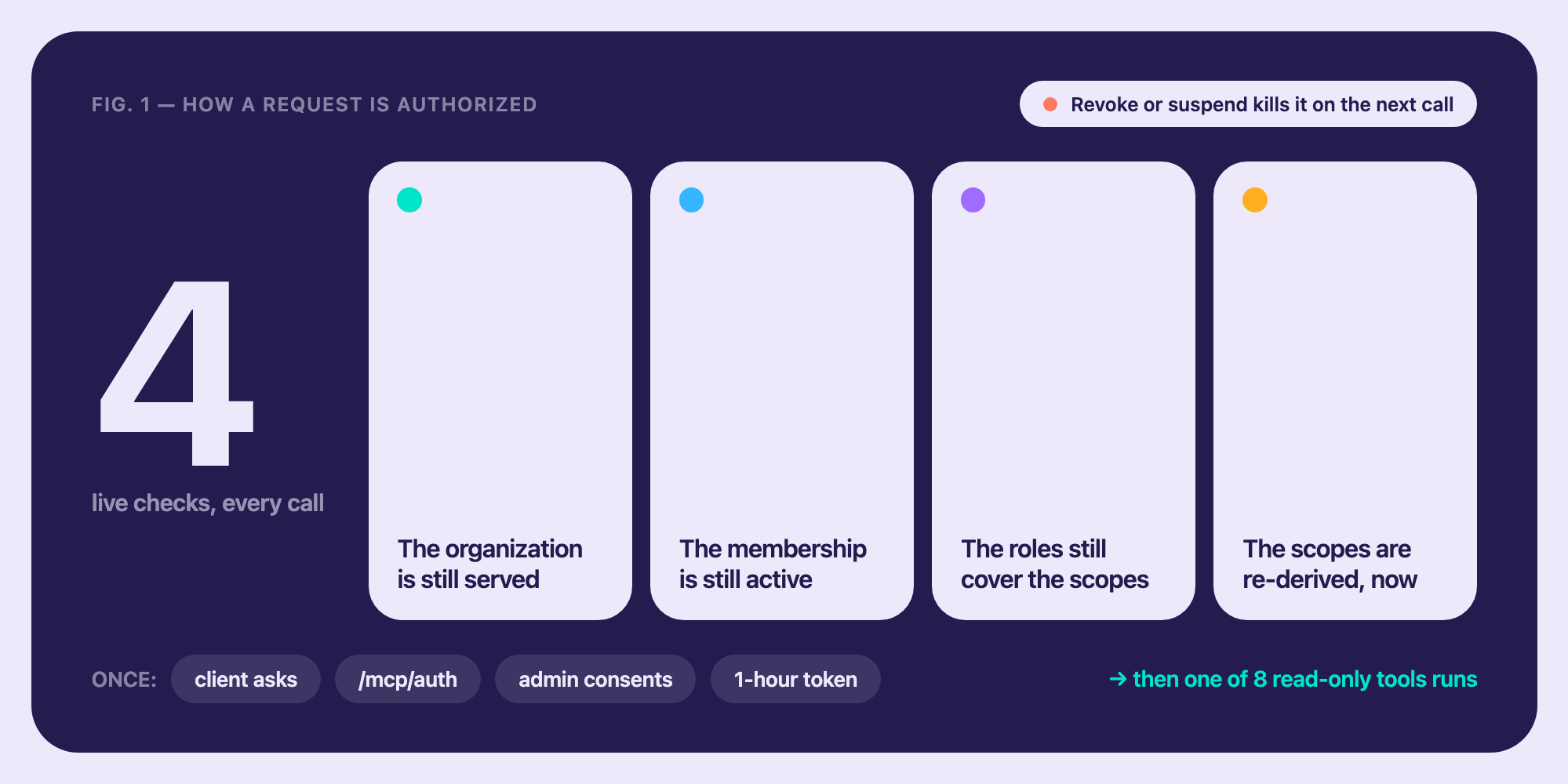
That last one is where most integrations quietly fail. The token is not the authority. Every tool call re-reads live state — is the membership active, do the approver’s current roles still cover these scopes and re-derives the scopes rather than trusting the grant. A permission change made at 14:00 is enforced on the next question, not at the next refresh and not at the next audit.
Read-only, on purpose
The MCP server was not given the ability to perform operations on behalf of an admin such as creating users, changing roles, quarantining devices, revoking sessions. Agents are what make that the correct decision rather than the cautious one.
Write actions in the future will ship behind step-up authentication, policy evaluation, and explicit confirmation. The ladder is read, propose, act under confirmation, act under policy. For now though the MCP tools are read-only.
What it does not solve
This governs our MCP server. Your estate will soon hold twenty more, each OAuthed into personally by every employee, no central visibility, no policy, no offboarding story.
There is a version of this where your IdP becomes the decision point for every one of them: an admin enables a server once, members inherit it through the groups they already have, and nobody sees a consent screen again. The standards to do it exist enterprise-managed authorization and the Identity Assertion Authorization Grant and we are building against them. That is the next note.
And an assistant is still an assistant: it can over-summarize and state a shaky inference confidently. What the server guarantees is provenance and boundary every figure came from your live estate, under a named person’s authority, within permissions you set, on a record you can inspect. The judgment stays human.
Every MCP server must answer two questions before returning a row: who is asking, and what may they see. Most will invent an answer an API key, a service account, a role map nobody reviews. The identity plane already holds both. Your directory has held these answers the whole time. What it never had was a
way to be asked.
The Directory MCP server is available to Trustaige ID organizations now admins will find it on the Applications page in the hub.
Next in this series: the other MCP servers your people are about to connect to, and what it takes for one console to govern them all.